
Mobile presets for smartphone
Golden stories


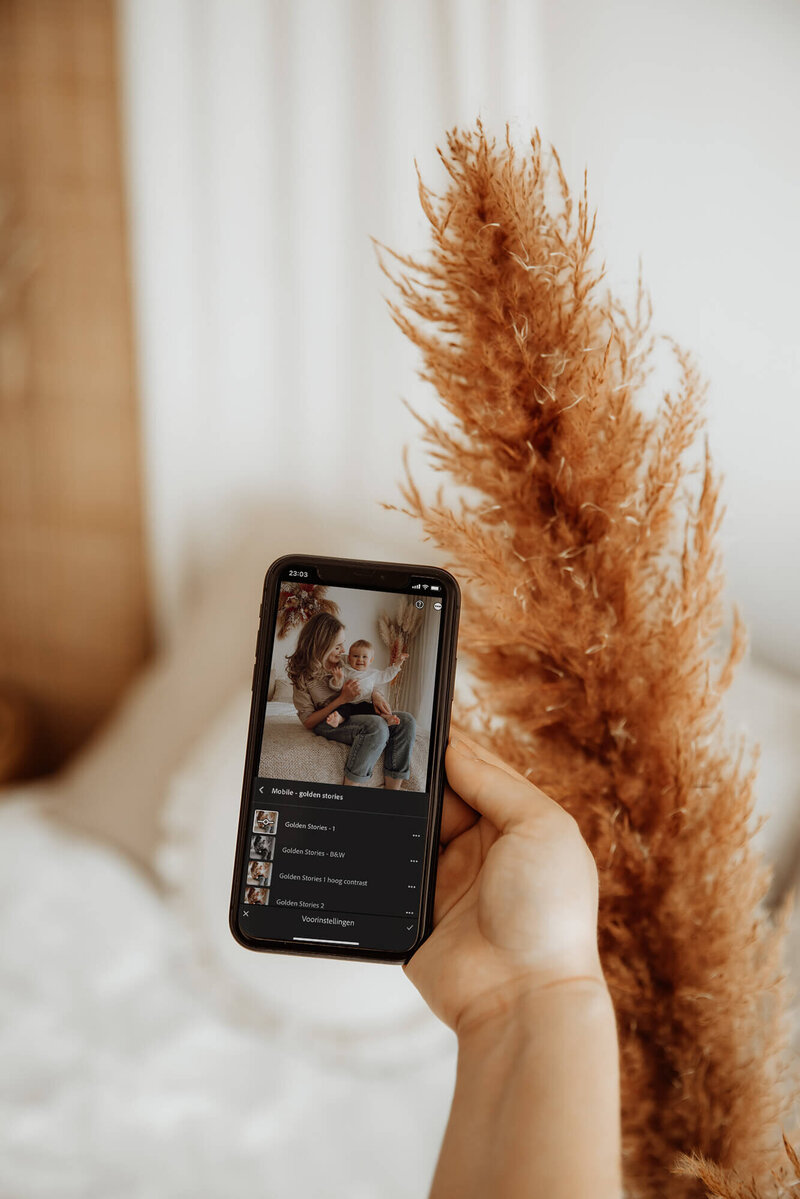
to be used with the free lightroom mobile app
BUY NOW
incl. VAT
Price:
Instruction video where I use the presets and adjust them to my photos (in Dutch)
Installation PDF with clear instructions
9 beautiful presets for mobile use in Lightroom (8 color + 1 black and white)
What do you get?
With the Golden Stories Mobile package, you add a subtle, warm touch to your photos. Ideal for moms, bloggers, travel photos, nature photos.... In short, preset Golden Stories is suitable for all circumstances!
With the edit of a professional photographer, your self-made images immediately get a professional look. This package contains a total of 9 presets. So there is always the perfect preset for your picture!


something for you...
Why these presets are
Create a consistent film roll or Instagram feed
Applicable to any photo and adaptable to your own preferences
Easy to use in the free Lightroom Mobile app
Create a brown & warm atmosphere in your photos
Gives your pictures a professional look
I want this
Price:


what others say about the presets

buy the mobile presets
Now you can get started editing your photos in Lightroom Mobile. Apply the presets to your photos and adjust them as you like.
edit your photo
Is your photo as you wish? Export it to your film roll, print it or share your photo on social media with the hashtag #simplestoriespresets!
save your photo
how does it work?
After the payment you will receive an email in which you will find a pdf. From there you can download the presets. Then import the presets into the Lightroom mobile app. All instructions can be found in the pdf.
import the presets


+ HOW AND WHEN DO I RECEIVE THE PRESETS?
+ WHY USE A PRESET INSTEAD OF AN INSTAGRAM FILTER?
+ WHAT SHOULD I CHOOSE? DESKTOP OR MOBILE?
+ ARE INSTRUCTIONS INCLUDED?
+ DO I GET MY MONEY BACK IF I AM NOT SATISFIED?
+ WHAT IS A PRESET?
+ HOW DO I USE THE MOBILE PRESETS?
+ CAN I APPLY THE PRESETS TO ALL MY PHOTOS?
+ WHY USE A PRESET INSTEAD OF AN INSTAGRAM FILTER?
+ WHAT SHOULD I CHOOSE? DESKTOP OR MOBILE?
+ ARE INSTRUCTIONS INCLUDED?
+ DO I GET MY MONEY BACK IF I AM NOT SATISFIED?
A preset is a pre-defined setting. You can compare it somewhat to a filter, but with more advanced functions. A preset adjusts the brightness, contrast, sharpness, colors,... of your photo in one click in a professional way. Then you can further edit the photos yourself.
WHAT IS A PRESET?
-
+ HOW DO I USE THE MOBILE PRESETS?
+ CAN I APPLY THE PRESETS TO ALL MY PHOTOS?
+ HOW AND WHEN DO I RECEIVE THE PRESETS?
+ WHY USE A PRESET INSTEAD OF AN INSTAGRAM FILTER?
+ WHAT SHOULD I CHOOSE? DESKTOP OR MOBILE?
+ ARE INSTRUCTIONS INCLUDED?
+ DO I GET MY MONEY BACK IF I AM NOT SATISFIED?
To use these presets you need Lightroom. The mobile presets work with the free Lightroom app, which you can use on your smartphone or tablet. Good to know: the mobile app is completely free to download. When you buy the presets, you get a handy pdf with instructions to learn how to use them.
HOW DO I USE THE MOBILE PRESETS?
-
+ WHAT IS A PRESET?
+ CAN I APPLY THE PRESETS TO ALL MY PHOTOS?
+ HOW AND WHEN DO I RECEIVE THE PRESETS?
+ WHY USE A PRESET INSTEAD OF AN INSTAGRAM FILTER?
+ WHAT SHOULD I CHOOSE? DESKTOP OR MOBILE?
+ ARE INSTRUCTIONS INCLUDED?
+ DO I GET MY MONEY BACK IF I AM NOT SATISFIED?
You can apply the presets to ALL your favorite photos. However, it is recommended to see which preset fits the photo best. This way, you have the right preset for every photo. However, it is recommended that you adjust the photo further yourself. No photo is taken under exactly the same circumstances so some basic adjustments are required. The preset forms a good basis.
CAN I APPLY THE PRESETS TO ALL MY PHOTOS?
-
+ WHAT IS A PRESET?
+ HOW DO I USE THE MOBILE PRESETS?
+ HOW AND WHEN DO I RECEIVE THE PRESETS?
+ WHY USE A PRESET INSTEAD OF AN INSTAGRAM FILTER?
+ WHAT SHOULD I CHOOSE? DESKTOP OR MOBILE?
+ ARE INSTRUCTIONS INCLUDED?
+ DO I GET MY MONEY BACK IF I AM NOT SATISFIED?
After checkout, you will immediately receive an email in your mailbox. This email will contain a zip file where you can download the presets along with the instructions and video. After you downloaded the presets, you can import them into the Lightroom app. Afterwards, you can use them unlimitedly.
HOW AND WHEN DO I RECEIVE THE PRESETS?
-
+ WHAT IS A PRESET?
+ HOW DO I USE THE MOBILE PRESETS?
+ CAN I APPLY THE PRESETS TO ALL MY PHOTOS?
+ WHAT SHOULD I CHOOSE? DESKTOP OR MOBILE?
+ ARE INSTRUCTIONS INCLUDED?
+ DO I GET MY MONEY BACK IF I AM NOT SATISFIED?
The settings in Lightroom are much more advanced than those of Instagram or your smartphone itself. Presets, on the other hand, give you the advantage of not having to adjust all the settings yourself. With a few clicks, your photo gets a nice look and feel.
WHY USE A PRESET INSTEAD OF AN INSTAGRAM FILTER?
-
+ HOW AND WHEN DO I RECEIVE THE PRESETS?
+ WHAT IS A PRESET?
+ HOW DO I USE THE MOBILE PRESETS?
+ CAN I APPLY THE PRESETS TO ALL MY PHOTOS?
+ WHY USE A PRESET INSTEAD OF AN INSTAGRAM FILTER?
+ ARE INSTRUCTIONS INCLUDED?
+ DO I GET MY MONEY BACK IF I AM NOT SATISFIED?
I personally recommend the desktop version for photographers and the mobile version for smartphone photography. You can also purchase an advantageous package with both versions. The mobile version does not work as desktop version and vice versa the desktop version is not suitable for mobile.
WHAT SHOULD I CHOOSE? DESKTOP OR MOBILE?
-
+ HOW AND WHEN DO I RECEIVE THE PRESETS?
+ WHAT IS A PRESET?
+ HOW DO I USE THE MOBILE PRESETS?
+ CAN I APPLY THE PRESETS TO ALL MY PHOTOS?
+ WHY USE A PRESET INSTEAD OF AN INSTAGRAM FILTER?
+ WHAT SHOULD I CHOOSE? DESKTOP OR MOBILE?
+ DO I GET MY MONEY BACK IF I AM NOT SATISFIED?
Yes! When you purchase my presets, you get an instruction PDF with all the information on how to install the presets. Along with that, you also get a video where you can see how I use the presets and how I adjust them on my photos. Please note that the instructions are only available in Dutch.
-
ARE INSTRUCTIONS INCLUDED?
+ HOW AND WHEN DO I RECEIVE THE PRESETS?
+ WHAT IS A PRESET?
+ HOW DO I USE THE MOBILE PRESETS?
+ CAN I APPLY THE PRESETS TO ALL MY PHOTOS?
+ WHY USE A PRESET INSTEAD OF AN INSTAGRAM FILTER?
+ WHAT SHOULD I CHOOSE? DESKTOP OR MOBILE?
+ ARE INSTRUCTIONS INCLUDED?
Unfortunately, no. Since this is a digital purchase, it is not refundable and the purchase of the mobile presets is final.
-
DO I GET MY MONEY BACK IF I AM NOT SATISFIED?
+ HOW AND WHEN DO I RECEIVE THE PRESETS?
+ WHAT IS A PRESET?
+ HOW DO I USE THE MOBILE PRESETS?
+ CAN I APPLY THE PRESETS TO ALL MY PHOTOS?
Questions
frequently asked
A preset is a pre-defined setting. You can compare it somewhat to a filter, but with more advanced functions. A preset adjusts the brightness, contrast, sharpness, colors,... of your photo in one click in a professional way. Then you can further edit the photos yourself.
To use these presets you need Lightroom. The mobile presets work with the free Lightroom app, which you can use on your smartphone or tablet. Good to know: the mobile app is completely free to download. When you buy the presets, you get a handy pdf with instructions to learn how to use them.
You can apply the presets to ALL your favorite photos. However, it is recommended to see which preset fits the photo best. This way, you have the right preset for every photo. However, it is recommended that you adjust the photo further yourself. No photo is taken under exactly the same circumstances so some basic adjustments are required. The preset forms a good basis.
After checkout, you will immediately receive an email in your mailbox. This email will contain a zip file where you can download the presets along with the instructions and video. After you downloaded the presets, you can import them into the Lightroom app. Afterwards, you can use them unlimitedly.
The settings in Lightroom are much more advanced than those of Instagram or your smartphone itself. Presets, on the other hand, give you the advantage of not having to adjust all the settings yourself. With a few clicks, your photo gets a nice look and feel.
I personally recommend the desktop version for photographers and the mobile version for smartphone photography. You can also purchase an advantageous package with both versions. The mobile version does not work as desktop version and vice versa the desktop version is not suitable for mobile.
Yes! When you purchase my presets, you get an instruction PDF with all the information on how to install the presets. Along with that, you also get a video where you can see how I use the presets and how I adjust them on my photos. Please note that the videos are only available in Dutch.
Unfortunately, no. Since this is a digital purchase, it is not refundable and the purchase of the mobile presets is final.